Website Design for Small Businesses: A Practical Guide
Start with what your customers need to do. A practical guide to choosing pages, booking or store features, planning the work and checking the finished website—with real portfolio examples.
Website design for small businesses should make one thing easier: a customer understanding your offer and taking the next step. That step might be a phone call, an appointment, a product enquiry or an online purchase. A beautiful homepage is useful only if the rest of that journey works.
I build websites, booking systems, online stores, dashboards and AI chat experiences. This guide uses the kinds of work shown in my portfolio to help business owners in India and Kerala decide what to build, what to prepare and what to check before launch. It is a planning guide, not a promise of search rankings or sales.
1. Choose the customer action before the design
Write down your main service, the people you serve and the action you want a visitor to take. Choose one primary action for each page instead of giving every button equal importance.
- A pet grooming business may need service information and an appointment request.
- A car dealership may need vehicle details and an enquiry about a specific car.
- A product business may need clear product pages and a purchase or ordering path.
These are different website requirements. A contact form can be enough for a first version; an online store or scheduling system adds a separate workflow that needs its own testing. Do not add an app, dashboard or AI chat simply because it is available. Add it when it solves a specific customer or staff problem.
2. Plan the pages and content customers actually need
For a service business, start with a homepage, useful service pages, information about the business and a contact page. For a shop, plan product listings and individual product pages as well. If customers book appointments, explain what they can book and whether a request is confirmed immediately or reviewed by staff.
- Homepage: what you offer, who it is for, where you work and the next step.
- Service or product pages: details, relevant photographs, prices when agreed, and a clear enquiry or purchase action.
- About: who runs the business and factual reasons a visitor can trust it.
- Contact: current phone and email details, service area or public location, and a working form.
- Policies: appropriate privacy, order, cancellation or refund information for the actual service you provide.
Use genuine photographs, approved testimonials and accurate business details. Get permission before publishing customer names or images. Avoid placeholder phone numbers, invented reviews and unverified claims. If you serve a local area, describe that area naturally rather than repeating city names throughout every paragraph.
3. Choose a website type that matches the job
A service website is a good starting point when customers mainly need to understand an offer and contact you. WordPress is one option for a business that needs multiple pages and editable content. Shopify is an option when the main job is running an online store. Custom website or app work is worth discussing when booking, staff tools or other requirements go beyond a standard setup.
My current pricing page separates the website builder, WordPress and Shopify options. Compare their listed features, then confirm a written scope for your own business. Do not assume that every package includes every integration.
Before agreeing a budget, ask which costs are one-off and which repeat. Clarify the domain, hosting or platform subscription, paid themes or plugins, payment-provider charges and ongoing support. Also agree who owns the accounts and who can edit the site after handover. A lower initial quote is not necessarily a lower total cost.
4. Use the portfolio to compare real requirements
Paws and Polish is a pet grooming platform in my selected work. Its listed scope includes a website, booking system, an admin dashboard with booking management, product listings and a PWA app model. The useful lesson is that the customer-facing booking journey and the staff-facing management journey need to be planned together.
Metro Cars India is an automotive website with a vehicle showcase and lead-generation flow. For this type of project, the important design question is how someone moves from browsing a vehicle to making an enquiry—not whether the homepage has the most animation.
Collagen Mariner is a health and wellness e-commerce brand with product pages and brand design. It illustrates why an online store needs attention at the product-page level, not just on its homepage. Product descriptions and health-related claims should be reviewed by the business before publication.
These examples describe the work listed in my portfolio. They are not claims about increased bookings, revenue or search positions. You can inspect the project links and screenshots below.
5. Take the project from brief to launch
My services cover concept-to-launch work, with communication and updates throughout. For your project, use the following sequence to make the scope and approvals clear. Exact stages, dates and responsibilities should be agreed for your own requirements.
Brief and scope
Share your business details, main customer action, existing website if any, required pages and features. List integrations separately: WhatsApp, contact forms, booking, payments or AI chat. Agree what is included, what is not and what needs an outside account or approval.
Content and design
Prepare your logo, photographs, service or product details and current contact information. Review the page structure and the way it looks on a phone before approving the design. Check that headings answer real customer questions and that the primary action is easy to find.
Build and review
Connect the agreed pages and features. Review with realistic input: a service enquiry, a booking request or a product selection. Decide who receives enquiries and who handles them. If a payment integration is in scope, distinguish test transactions from a verified live payment flow.
Launch and handover
Check the final content, website address, account access and agreed features before going live. Confirm who is responsible for updates, backups and support, rather than assuming these continue indefinitely. Keep a record of the approved scope and the accounts needed to operate the website.
6. Check the finished website on a real phone
- Read every page without zooming, and check that text and controls do not overlap.
- Tap the phone, WhatsApp and email links and confirm that they use the correct details.
- Submit a real test enquiry and confirm it reaches the intended place; a success message alone is not proof of delivery.
- If booking is included, check the customer request and the staff view of that same booking.
- If ordering is included, check product details, checkout, confirmation and the business’s order record.
- Review image sizes and loading speed on a normal mobile connection, not only fast office Wi-Fi.
- Check page titles, descriptions, public page links and sitemap availability.
- Remove draft content and ensure private staff or customer information is not exposed publicly.
7. Make search visibility part of the foundation
Give each important service or product a useful page with a descriptive title and heading. Keep public pages linked from the website so visitors and search engines can find them. A sitemap and Google Search Console help you monitor discovery, but neither guarantees indexing or a particular position.
For an eligible local business, keep your Google Business Profile accurate and link it to your website. Use the same real business details across both. Search visibility depends on factors beyond design, so treat launch as the start of ongoing improvement—not a guarantee of customers.
8. Measure the customer action, then improve
Track meaningful outcomes such as genuine enquiries, completed bookings or orders alongside visits. A page view is not a customer, and a form submission is not automatically a sale. Ask whether visitors can find the right service, understand the offer and complete the next step.
Improve a confusing page or broken contact path before adding more features. The right first website is the smallest version that reliably serves your customers and that your business can maintain.
Ready to plan your small-business website?
Bring a short list of your services or products, your service area, the customer action you want and any features you already know you need. Use the contact link below to discuss the scope, or compare the existing portfolio and website options first.
Explore the projects
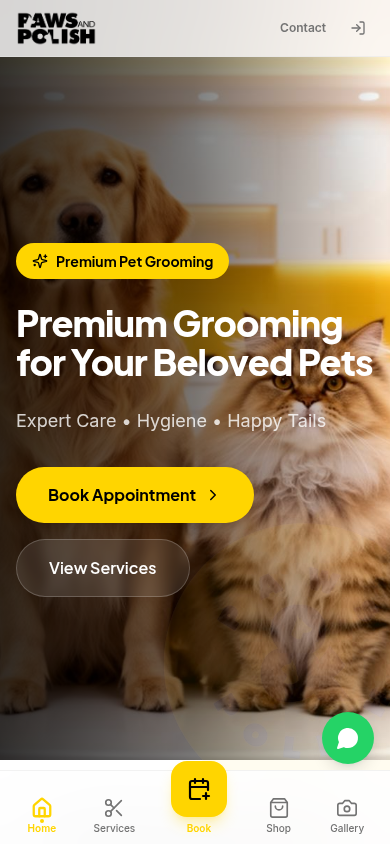
Booking & management
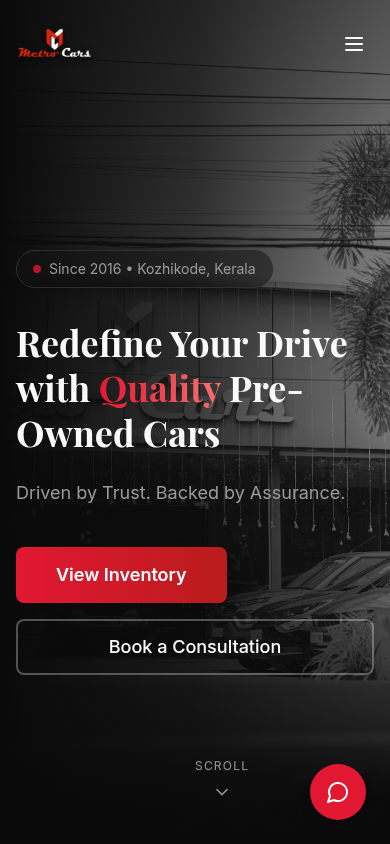
Vehicle showcase & enquiries

E-commerce & product pages